NASCAR MOBILE
- 4.5
- Rating
- 1.00M
- Installs
- Free
- Price

 Analysis by App-foxy
I approached NASCAR MOBILE as a sports companion rather than just another race-day app. Its main appeal is clear: it brings NASCAR information, live-race context, deeper statistics, telemetry and scanner audio into one place. After spending time with it, I found that its value depends heavily on how closely you follow the sport. A casual viewer may only need a schedule and occasional results, while a committed fan can use the app as a second screen throughout an entire race.
The app is free to download, carries an Everyone age rating, and comes from NASCAR Digital Media, LLC. Its long presence in the sports category also gives it a more established feel than a temporary event app. It has been available since January 18, 2013, and its current version is 16.1.2.2649. That history matters because NASCAR is not a sport where one isolated race tells the whole story; following drivers, teams and season-long trends benefits from a tool that remains useful between events.
What the app feels like when you use it on race day
The strongest way to use NASCAR MOBILE is with the television broadcast or a live stream running nearby. The broadcast gives you the visual drama, while the app helps answer the questions that naturally come up during a race: who is gaining, who has fallen back, what has changed after a pit stop, and which driver deserves closer attention during a restart.
You May Also Like

 Blood Strike: 2.5 Anniversary
Blood Strike’s Loadouts Turn Every Drop Into a Tactical Gamble
A close look at Blood Strike’s custom loadouts: how fast access to signature weapons reshapes its battle royale rhythm, rewards preparation, and narrows the gap between fights.

 Pandora - Music & Podcasts
Pandora’s Music Is Easy to Start, but Harder to Recover
Pandora’s strength is its low-effort path from a seed to a station. Its weak spot is how much confidence it asks you to place in connection, setup, and quiet recovery.

 8 Ball Pool
 Is Built on Rivalries, Rematches, and Routine
A close look at the rivalries, rematches, shared routines, and unanswered safety questions that turn a quick pool match into a persistent mobile community.

 Samsung Music
’s Quiet Strength Is Playing What You Already Own
Its reach comes less from spectacle than from dependable access to a personal library. That simplicity is both the app’s strongest retention engine and its ceiling.

 AccuWeather: Weather Radar
AccuWeather Review: A Quick, Clear Forecast for Everyday Decisions
For everyday plans, the best forecast is the one you can understand quickly. AccuWeather makes rain timing, radar, and local conditions easy to act on, with a few trade-offs.

 Hill Climb Racing
Why Hill Climb Racing Still Turns Crashes Into One More Run
A tiny car, a bumpy hill and one more upgrade: Hill Climb Racing keeps resurfacing because its simple chaos makes every near-miss feel personal.
More From Our News Desk



I would not treat it as a replacement for watching the race. Its purpose is more practical. It gives your attention somewhere useful to go during cautions, commercial breaks or stretches when the field settles into a rhythm. If you are watching with friends, it can also settle those quick arguments about a driver’s recent form or current position without forcing everyone to search through a browser.
A realistic everyday scenario is a Sunday afternoon when I have the race on the television but need to step away briefly. The app can act as a compact reference point when I return, helping me reorient myself instead of waiting for the broadcast graphics to explain everything again. For a fan who follows several drivers, that small convenience adds up over a full season.
The experience is also useful away from live events. I can imagine opening it before a race to refresh my understanding of the field, checking information during a conversation, or using it after the finish to put the result into a broader statistical context. That makes it more durable than an app built solely around a single live feed.
Still, the amount of information can be more valuable to experienced fans than newcomers. NASCAR has its own language, race structure and strategic details, and the app assumes that you already understand at least the basics. It can support your knowledge, but it is not the best place to learn the sport from the beginning. A beginner looking for a calm, guided explanation may prefer a general NASCAR guide or a well-organized video recap first.
Free access and the premium decision
The free entry point is important. You can try the app without committing money immediately, which makes it easier to judge whether its race-day tools fit your habits. The premium direction is centered on deeper NASCAR statistics, live telemetry and unfiltered scanner audio. Those are not equally useful to every fan, so I would avoid treating the upgrade as an automatic purchase.
For me, telemetry and scanner audio make the most sense when I am actively following a race rather than casually checking a result. Telemetry can add detail to the way a race is unfolding, while scanner audio can make the event feel closer to the teams and drivers. However, those features also demand attention. If I am cooking, commuting or watching only occasionally, I may not have enough focus to benefit from them.
In-app purchases range from $2.99 to $29.99 per item. That broad range is a reason to inspect the purchase screen carefully before confirming anything. The sensible approach is to begin with the free experience, identify which premium feature would actually change the way you watch NASCAR, and then decide whether that single benefit justifies the cost.
My practical tip is to test the app during a race you already planned to watch, not during a quiet week. Live telemetry and scanner audio are easiest to judge when there is real action to follow. This prevents paying for a feature that sounds impressive in theory but does not fit your normal viewing style.
Trust starts with visible choices
Because this is a sports app connected to a major racing organization, I pay attention to how much control the user appears to have. The most trustworthy experience is one where the purpose of each screen is understandable and choices are visible rather than hidden behind confusing prompts. In NASCAR MOBILE, I would treat the account and purchase areas as places to slow down and read before accepting anything.
That is especially relevant for premium content. A user should know whether they are entering a one-time purchase flow or another type of transaction before proceeding. The price range makes this more important, since a small feature purchase and a higher-priced package represent very different commitments. I recommend reviewing the wording, confirmation screen and device-level purchase controls rather than tapping through automatically.
I also prefer using an account only when it provides a clear benefit. If the app asks me to sign in, I would consider whether that is needed for the feature I want, whether it helps preserve preferences, or whether I am only browsing information that should be available without a personal profile. That is not a criticism of this particular app; it is a useful habit for any app that combines content, personalization and purchases.
The developer is NASCAR Digital Media, LLC., which gives the app a direct connection to the sport it covers. That can increase confidence in the relevance of the content, but it does not remove the need to review the app’s own choices carefully. A recognizable developer is not a substitute for understanding what an account does or how premium access is presented.
Data-sensitive moments during normal use
The moments that deserve the most attention are not the race statistics themselves. They are the points where the app may ask for an account, open a purchase flow, or encourage more continuous engagement through live features. Scanner audio and telemetry can make a race more immersive, but they may also lead me to keep the app open for longer than I originally planned. I would make that choice deliberately, especially when using mobile data or a limited battery.
Before a long race, I would also check the phone’s normal system controls for the app. Reviewing notification settings is a simple way to decide whether I want alerts interrupting other activities. If I am working, I might keep only the notifications I consider useful; if I am following the event closely, I may allow more. The important point is that the phone’s controls should remain part of the setup rather than leaving every alert enabled by default.
The same principle applies to background activity. Live sports features naturally create a reason to keep information current, but I do not need every live function running when I am not watching. Closing the app when finished, limiting unnecessary notifications and checking battery behavior during a full race are sensible ways to keep the experience under control.
I would also avoid assuming that premium audio is appropriate in every environment. Scanner audio may be interesting at home with headphones, but it can be distracting in a workplace, around children or while driving. The app can be useful in those settings only if I treat it as something to use at the right moment, not as constant background noise.
One non-obvious advantage of separating the app from the main broadcast is that I can choose how much information enters my attention. I might use basic race context while watching with family, then explore telemetry later when I have time to concentrate. That ability to change the intensity of use is more valuable than simply having the largest possible amount of information on screen.
How much control does the user really have?
User agency here comes from choosing the depth of the experience. I can remain a light user who checks race information occasionally, or I can turn the app into a detailed second-screen tool with premium statistics, telemetry and scanner audio. That range is a strength because it avoids forcing every fan into the same level of commitment.
It also means I need to manage the app actively. A fan who enables every alert, buys premium access immediately and leaves live features open all day may end up with a noisier experience than intended. I prefer a staged setup: use the free features first, adjust notifications, then add one premium element only if it solves a real problem in the way I follow NASCAR.
Another useful workflow is to separate research from live viewing. Before the race, I can use the app to prepare the drivers or storylines I care about. During the race, I can limit myself to the information that helps me understand changes on track. Afterward, I can return to statistics without trying to process everything at once. This makes the app feel less overwhelming and helps prevent premium tools from becoming distractions.
There is also a clear trade-off between convenience and concentration. A single sports app is easier than jumping among a browser, social media and several specialist tools. On the other hand, a dedicated statistics site may offer a calmer research experience, while a broadcast may provide better visual explanation. NASCAR MOBILE is strongest when it fills the gap between those options rather than trying to replace all of them.
Where it beats ordinary alternatives
Compared with checking a general sports app, NASCAR MOBILE should feel more focused because its purpose is tied specifically to NASCAR. A general service may be better if I follow many sports and want one place for scores across all of them. But when I want NASCAR-specific context, the dedicated approach is more convenient and less cluttered.
Compared with a browser search, the app is better suited to repeated race-day checking. Searching can answer one question, but it takes more effort and often sends me through unrelated pages. An app built around NASCAR lets me return to the same environment, which is useful when the race changes quickly.
Compared with social media, the app offers a more controlled way to follow the event. Social platforms can add conversation and instant reactions, but they can also bury useful information under opinions, spoilers and unrelated posts. I would choose social media for community discussion and NASCAR MOBILE for structured race information.
Compared with the television broadcast alone, the app adds depth rather than replacing the visuals. The broadcast remains the better choice for seeing incidents, pit stops and the overall flow of the race. The app becomes the better companion when I want to investigate what happened instead of simply watching it happen.
The main limitation is that this focus may feel unnecessary if I only watch a few major races each year. In that case, a general sports app or the broadcaster’s basic coverage may be enough. NASCAR MOBILE earns its place more convincingly for fans who return regularly and want continuity between events.
Who should use it, and who should skip it?
I would recommend it to NASCAR followers who enjoy understanding the race beyond the headline result. It is particularly suitable for people who like comparing drivers, checking developing situations and using a phone as a companion while watching television. Fans who enjoy radio-style race atmosphere may also find the scanner audio appealing, provided they are willing to consider the premium cost and use it in an appropriate setting.
I would be more cautious about recommending it to someone who wants only a simple schedule, occasional news or a quick final result. The app’s deeper possibilities may be more than that person needs. A lightweight sports scoreboard could be faster for a single glance, especially if NASCAR is only one of many competitions they follow.
It may also be a poor fit for users who dislike account prompts, in-app purchases or highly active live coverage. Even when the free option is enough, the presence of premium features can make the experience feel more commercial than a basic results tool. Anyone particularly sensitive to notifications should configure them immediately instead of accepting a busy default setup.
Parents should also remember that the Everyone rating describes the app’s age suitability, not whether every live feature is appropriate for every household situation. Scanner audio, purchases and frequent alerts are separate considerations. I would keep device purchase protections enabled and decide together with younger users which parts of the app they are allowed to use.
My measured verdict after using it
NASCAR MOBILE is a focused sports app with a convincing reason to exist: it gives committed NASCAR fans more control over how deeply they follow a race. Its free availability makes experimentation easy, while premium statistics, telemetry and scanner audio create a more immersive option for users who want more than the television broadcast provides.
The app has a 4.5 average from around 100K ratings, with over 1M installs, so it is clearly reaching a substantial audience. Those figures are useful context, but they do not decide whether it belongs on your phone. The better question is whether you regularly want NASCAR-specific information beside the race itself.
My recommendation is to start conservatively. Install it, use the free experience during a live event, adjust notifications and observe whether the extra information genuinely improves your viewing. If you find yourself wanting deeper statistics, live telemetry or scanner audio, then examine the relevant in-app purchase rather than buying everything at once.
The app is most trustworthy as a user-controlled companion, not as something to leave running without thought. Read purchase prompts, manage alerts, use live features when they suit your situation and keep your account choices intentional. With that approach, it becomes a useful NASCAR tool for serious followers. For occasional viewers seeking only a quick score, it is probably more app than necessary.
FAQs for NASCAR MOBILE
01What features does NASCAR MOBILE offer to enhance the fan experience?
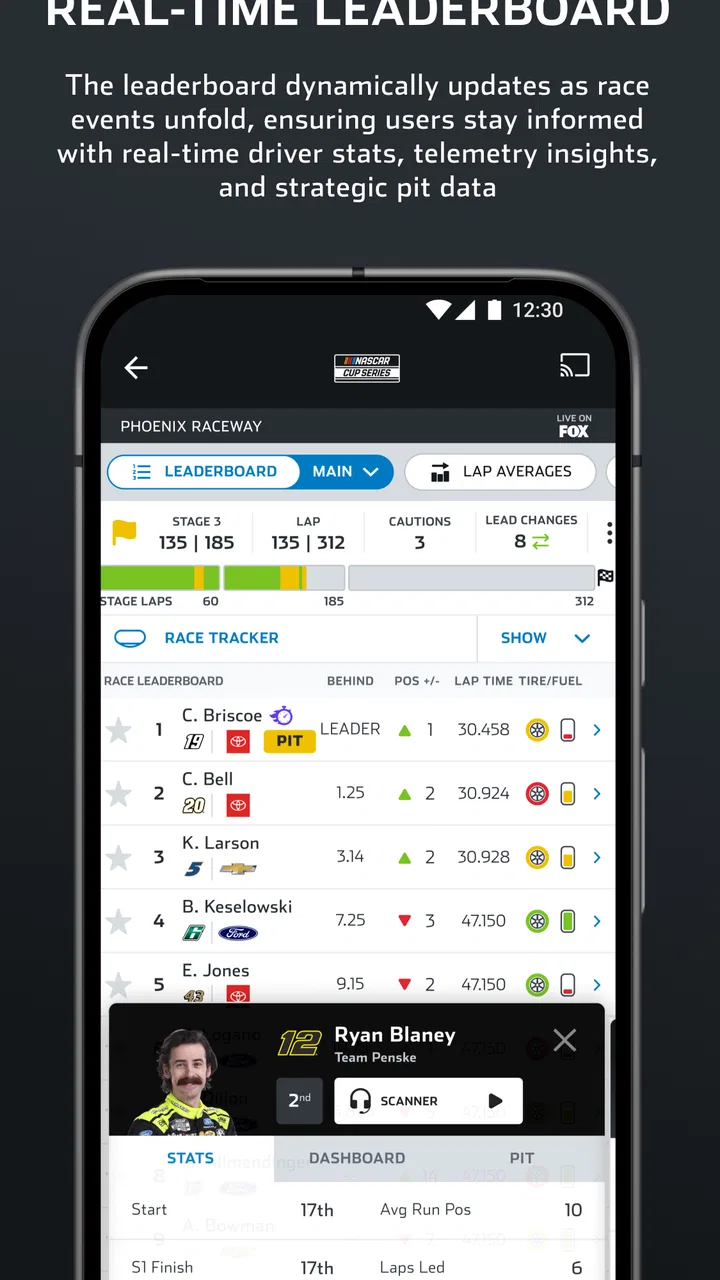
NASCAR MOBILE provides a comprehensive fan experience with features like live race updates, driver and team news, and in-car camera feeds. Fans can also access driver radios, race highlights, and exclusive content. Additionally, there’s a customizable leaderboard and the ability to follow favorite drivers, making it a must-have for NASCAR enthusiasts.
02Is NASCAR MOBILE free to use, or does it require a subscription?
NASCAR MOBILE offers both free and premium content. While many features are accessible for free, such as race schedules and basic news updates, premium content like live in-car camera feeds and driver audio requires a subscription. Users can choose between a monthly or annual subscription for full access.
03How can I personalize my experience in NASCAR MOBILE?
Personalization in NASCAR MOBILE is easy with options to follow your favorite drivers and teams. Users can customize their leaderboard and receive tailored notifications for updates on their chosen drivers. This feature ensures that fans stay connected with the most relevant and exciting race information.
04What are the technical requirements for installing NASCAR MOBILE?
NASCAR MOBILE is available for both Android and iOS devices. For Android, it requires version 6.0 or higher, while iOS users need version 12.0 or later. The app requires a stable internet connection for streaming features and regular updates to ensure optimal performance and access to the latest content.
05How reliable is the live streaming feature on NASCAR MOBILE?
The live streaming feature on NASCAR MOBILE is generally reliable, offering real-time race updates, in-car camera views, and driver audio. However, the quality of the stream can depend on the user's internet connection. For the best experience, a strong and stable Wi-Fi or mobile data connection is recommended.
Pros
- Real-time race updates enhance user engagement.
- Live driver audio gives an immersive experience.
- Customizable notifications keep fans informed.
- In-depth stats for hardcore racing enthusiasts.
- Exclusive content for NASCAR fans.
Cons
- Ads can disrupt the user experience.
- Premium features require a subscription.
- Occasional app crashes reported by users.
- Limited offline functionality.
- Some users find navigation unintuitive.

NASCAR MOBILE
Gallery